
Wireless CarPlay Adapter USB-C Mini Size for iPhone iOS Stable Connection
The Wireless CarPlay Adapter USB-C Mini is a small plug-and-play dongle that converts any factory-wired CarPlay head unit into a wireless one. Plug it into your car’s existing USB-C data port, pair your iPhone once over Bluetooth, and CarPlay automatically reconnects every time you start the engine — no Lightning cable required.
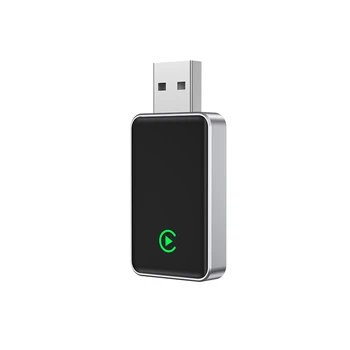
Product Overview
This adapter is a compact black-box dongle with a USB-C connector on one end and a small status LED on the front. Once paired, your iPhone connects automatically on every drive. The dongle weighs only a few grams and tucks behind the dashboard so it’s invisible after installation.
Who It’s For
This product is for drivers who already have factory wired CarPlay in their car and want to ditch the Lightning cable that they have to plug in every time they get in. It is not for adding CarPlay to cars that don’t already have it factory-installed, and it is not an Android Auto adapter.
It’s also for anyone who frequently hops in and out of the car with passengers, or who charges the phone via wireless charging pad and wants CarPlay to work over Bluetooth without a cable.
Key Features
- USB-C connector — plugs directly into modern cars’ USB-C data ports without adapters.
- Bluetooth 5.x auto-pairing + 5GHz WiFi — first-time setup is one Bluetooth tap; subsequent drives reconnect in seconds with minimal latency.
- Compact housing — hides behind the dashboard, out of sight once installed.
- Status LED — shows connection state at a glance.
What to Verify Before You Buy
- Confirm your car has factory wired CarPlay. This adapter does not add CarPlay to cars without it.
- Identify which USB port is the data port (not charge-only). On most cars it’s the one inside the center console or marked with a phone-icon.
- Check that your iPhone runs iOS 10 or later — required for CarPlay.
- Allow 15-30 seconds for first-time boot. After that, connection is automatic.
Practical Use
Setup is genuinely plug-and-play. Plug the dongle into your car’s USB-C data port, wait for the LED to indicate ready state, open Bluetooth on your iPhone, pair with the dongle, accept the CarPlay prompt, and you’re done. From the next drive forward, your phone connects automatically the moment you sit down.
Audio quality is on par with wired CarPlay — Spotify, Apple Music, podcasts, and phone calls all sound the same. Navigation in Apple Maps or Waze (via CarPlay) is responsive with no perceptible lag. Siri works identically to wired CarPlay.
Main downside: if your phone battery dies, you lose CarPlay (no wired fallback).
Related Deals on AliExpress
Browse AliExpress’s Top On Sale hub for similar products at promotional prices. Many top-rated items ship free with AliExpress Standard Shipping.
USB This is reader-supported. When you buy through links on our site, we may earn an affiliate commission at no extra cost to you. See our Affiliate Disclosure for details.
